
Standalone AI Video Projects: Create, Edit Scenes, and Rebuild Faster
Learn how standalone video projects in ContentGenia help you create AI videos, regenerate individual scenes, update reference images, and rebuild the final cut without starting over.
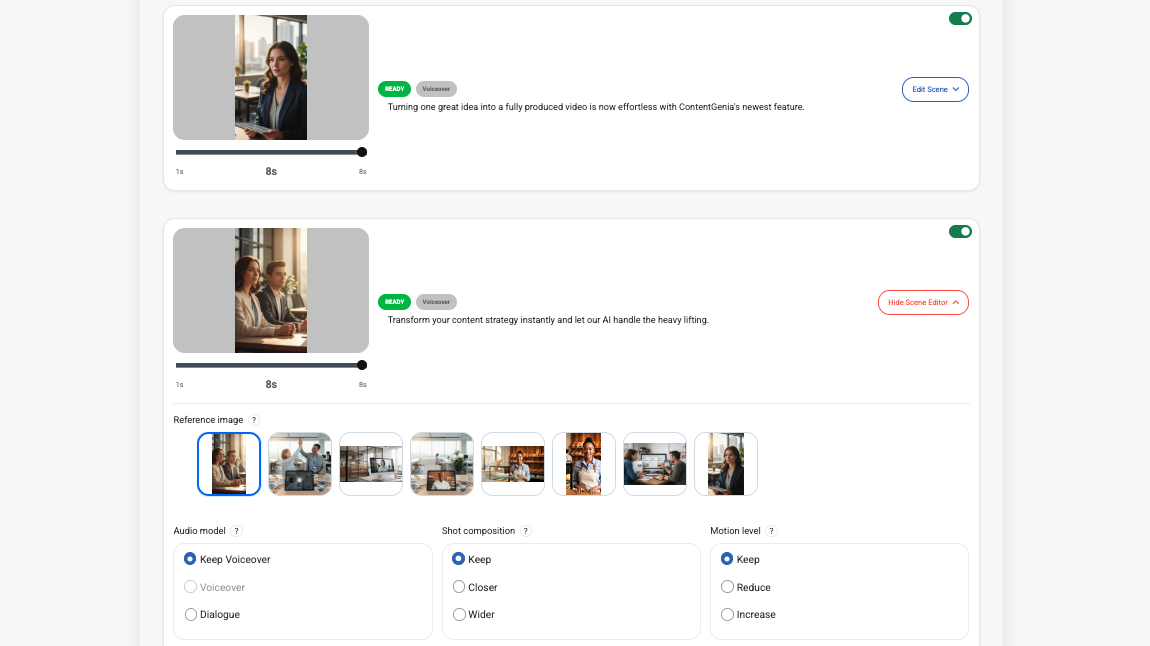
Standalone AI Video Projects: Create, Edit Scenes, and Rebuild Faster
Creating AI video content should feel flexible, not fragile.
Too often, video tools force you to start over the moment one scene is off. Maybe the hook works, but scene two needs a better reference image. Maybe the pacing feels right, but one clip looks too generic. Maybe the concept is strong, but a single scene needs a more product-focused direction.
That is exactly the problem we wanted to solve with ContentGenia’s standalone video project workflow.
Why We Built Standalone Video Projects
Most AI video workflows are optimized for speed at the beginning, but not for control once the first result appears.
In real creative work, that is not enough.
Teams rarely want to throw away an entire video because one scene needs improvement. They want to preserve what is already working, fix the weak point, and move forward without rebuilding everything from zero.
Standalone video projects were built to support that kind of workflow.
With ContentGenia, you can create a video as its own dedicated project, guide it with seed images, review the generated scenes, and refine individual scenes before rebuilding the final cut.
How the Workflow Works
The standalone video workflow is designed to keep creation fast while making revision much more practical.
1. Start With a Single Video Idea
You begin with a focused video concept and create a standalone video project around it.
Instead of bundling video into a larger multi-output workflow, this project type gives the video its own dedicated generation path. That makes it easier to concentrate on the message, the visuals, the pacing, and the final structure of the video itself.
2. Generate the Initial Video Plan and Scenes
ContentGenia plans the scenes, generates the clips, and assembles the video for you.
This gives you a complete first version quickly, but it does not lock you into that first result.
3. Review Individual Scenes
Once the video is generated, you can inspect the scene lineup and identify what is working and what needs improvement.
Maybe one scene needs a stronger visual reference. Maybe another should feel more product-focused. Maybe a single shot needs better composition or a cleaner subject.
That kind of review is where most AI video tools become rigid. ContentGenia is designed to stay flexible.
4. Regenerate Only the Scene That Needs Work
If a scene needs improvement, you can open the scene editor and regenerate only that specific scene.
You can update the reference image, adjust the creative direction, refine the visual intent, and rerun that one scene without discarding the rest of the project.
That means the workflow becomes much more usable in practice. You are not gambling on a single perfect prompt. You are shaping the final result scene by scene.
5. Rebuild the Final Video
After updating the scene you want to improve, you can stitch the project back together and rebuild the final video.
This makes revision feel far more natural. Instead of restarting the entire generation cycle, you keep the scenes that already work and improve only the parts that need attention.
Why Scene-by-Scene Editing Matters
This workflow is valuable because it matches how creative teams actually work.
A founder may want to swap a reference image in one scene without losing the rest of the video.
A marketer may want to keep the structure of the message intact while improving one weak shot.
A creator may want to tighten a single moment, adjust the visual tone, or refine one scene’s pacing without touching the entire piece.
That is the real advantage of standalone video projects. They turn AI video creation into a more editable and recoverable process.
Instead of this:
- generate everything
- dislike one scene
- start over
You get this:
- generate the video
- review the scene lineup
- fix the exact scene that needs work
- rebuild the final cut
That is a much better experience for real-world publishing.
Better for Short-Form Video Workflows
Standalone video projects are especially helpful for short-form video creation.
When you are building vertical videos for fast-moving marketing channels, small scene-level improvements can make a big difference. A better reference image, a cleaner subject, or a stronger visual moment can improve the final video without requiring a full reset.
That lets you move quickly without giving up control.
Built for Usable AI Video, Not Just Fast AI Video
At ContentGenia, we are not just trying to help teams generate more content.
We want to help them generate content they can actually refine, improve, and publish with confidence.
That is why standalone video projects matter. They give you speed at the beginning, control in the middle, and better results at the end.
Final Thoughts
If you want to create AI videos without losing control over the details, standalone video projects are a much better workflow.
You can generate a full video, edit individual scenes, update references, and rebuild the final result without starting from scratch.
That is the kind of flexibility modern content teams need, and it is exactly what we built this workflow to support.
See It in Action
Turn one idea into an editable AI video with ContentGenia.